Posting on Pinterest feels like a full-time job. You know you should pin consistently, but finding time between everything else? Nearly impossible. The result: your beautiful content sits unseen while your audience finds someone else. So, Is Tailwind Worth it for Pinterest? Let’s see how Tailwind solves this issue by automating your Pinterest strategy, giving you hours back while actually growing your reach.
- 1. What Exactly Is Tailwind?
- 2. How Does Tailwind Save You Time?
- 3. Will Tailwind Actually Grow Your Pinterest Following?
- 4. Is the Learning Curve Too Steep?
- 5. What About the Cost? Is Tailwind Worth the Investment?
- 6. Are There Any Downsides to Using Tailwind?
- 7. How Do You Get Started with Tailwind?
- 8. Frequently Asked Questions
- Take Your Pinterest to the Next Level
This post contains affiliate links. If you make a purchase, I may earn a small commission at no extra cost to you. I only recommend tools I truly trust!
Start Here > Content and Affiliate Marketing > Social Media Marketing > Email Marketing > Video Creation > YouTube Creator > Resources > Reviews
1. What Exactly Is Tailwind?
Tailwind is a scheduling and marketing tool built specifically for visual platforms like Pinterest and Instagram. Think of it as your personal Pinterest assistant.
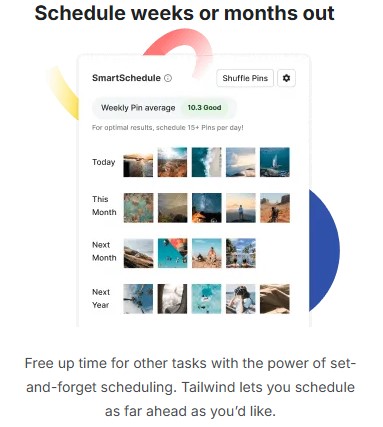
Instead of manually pinning throughout the day, you upload your content once. Tailwind then schedules everything at optimal times when your audience is most active. It’s like meal prepping – do the work once, enjoy the benefits all week!
The platform also suggests the best posting times based on your account’s performance, something you’d never figure out on your own without hours of testing.
2. How Does Tailwind Save You Time?
a) Can You Really Schedule Pins in Advance?
Absolutely. You can batch-create pins for the entire month in one sitting.
Upload your images, write descriptions, add relevant boards, and let Tailwind handle the rest.
Most users report saving 5-10 hours weekly. That’s time you can spend creating content, connecting with family, or simply relaxing.
b) Does It Work with Multiple Boards?
Yes, and this feature is brilliant. You can schedule one pin to multiple boards without posting it all at once (which Pinterest dislikes).
Tailwind spaces them out naturally, keeping your account in Pinterest’s good graces.
You’ll also discover board communities called Tailwind Communities where members share each other’s content, instantly expanding your reach beyond your followers.
3. Will Tailwind Actually Grow Your Pinterest Following?
Here’s where Tailwind shines. Consistent pinning signals to Pinterest that you’re an active, valuable user. The algorithm rewards this by showing your content to more people.
Key benefits:
- SmartSchedule identifies when your specific audience is online
- Analytics show which pins perform best, so you create more of what works
- Tailwind Create designs professional pins in minutes, even without graphic design skills
Many users see 30-50% growth in impressions within the first three months. The secret isn’t magic – it’s consistency, which Tailwind makes effortless.
4. Is the Learning Curve Too Steep?
Not at all. Tailwind was designed for everyday users, not tech experts.
The dashboard is clean and intuitive. You’ll navigate confidently after about 15 minutes of exploring.
Their tutorial videos explain everything in plain English, and customer support responds quickly when you’re stuck.
If you can send an email, you can use Tailwind.
5. What About the Cost? Is Tailwind Worth the Investment?
Tailwind offers a free trial so you can test before committing.
Paid plans start around $29.99/month with a 40% discount if paid annually $17.99/month.
This gives you: 1 user account, 150 credits, 200 post designs, and 5 Tailwind communities plus more.
Consider this: if Pinterest drives traffic to your blog, shop, or business, those visitors have real value. Even a handful of new customers monthly pays for Tailwind many times over.
For hobbyists without monetization goals, the time savings alone justify the cost. Your time has value too.
6. Are There Any Downsides to Using Tailwind?
Transparency matters. While Tailwind is excellent, it’s not perfect.
The mobile app has fewer features than the desktop version, so you’ll want a computer for initial setup.
Also, Pinterest occasionally updates its policies, and Tailwind must adapt accordingly – though they’re quick about it.
Some users mention the Communities feature requires participation (you can’t just take without giving). However, this actually builds genuine connections rather than empty follower counts.

7. How Do You Get Started with Tailwind?
Getting up and running takes under an hour:
- Sign up for Tailwind’s free trial
- Connect your Pinterest account (with one click)
- Add your first 5 pins to the queue
- Let SmartSchedule optimize your posting times
- Check back weekly to monitor results and add fresh content
Start small. Schedule just five pins daily for your first week. As you grow comfortable, increase gradually. There’s no rush.
8. Frequently Asked Questions
Can I use Tailwind for Instagram too?
Yes, the same subscription covers both platforms, doubling your value.
What if I don’t have many pins yet?
Tailwind Create helps you design new pins quickly using templates. You’ll build your library faster than you think.
Will my account look spammy with scheduled posts?
Not when you use SmartSchedule. It spaces pins naturally, mimicking human behavior rather than robotic posting.
Take Your Pinterest to the Next Level
You’ve spent years building skills, raising families, managing careers. Now it’s time to share your wisdom, creativity, or business with people who need it.
Is Tailwind Worth It for Pinterest? Yes, Tailwind removes the technical barriers between you and your audience.
The platform handles the tedious scheduling work while you focus on creating meaningful content.
Start your free Tailwind trial today and experience what consistent Pinterest marketing feels like without the overwhelm.
Next step: Once you’ve mastered scheduling, learn how to create viral-worthy pin designs that stop the scroll. Check out my next post: “Pinterest Design Tips for Beginners Over 50.”